

PrintBill – WiFi POS Billing & Receipt Printing Application
PrintBill is a focused, cross-platform Point of Sale (POS) billing application built with Flutter. It enables store operators to browse products, manage a shopping cart, and print thermal receipts wirelessly via a network-connected ESC/POS printer all from a single mobile or tablet device.
The application follows a clean MVC-style architecture using GetX for state management and a reactive UI. The printer communication layer uses the ESC/POS protocol over TCP/IP (port 9100), enabling seamless integration with standard WiFi-enabled thermal printers. A built-in network scanner automatically discovers available printers on the local subnet, reducing the need for manual configuration.
See It In Action
Real screens from the shipped product crafted for an intuitive, smooth, and delightful user experience.
Key Features
Product Catalog :
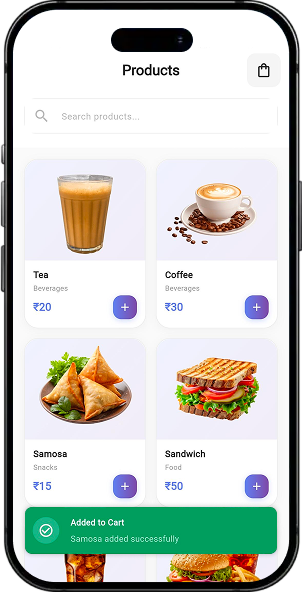
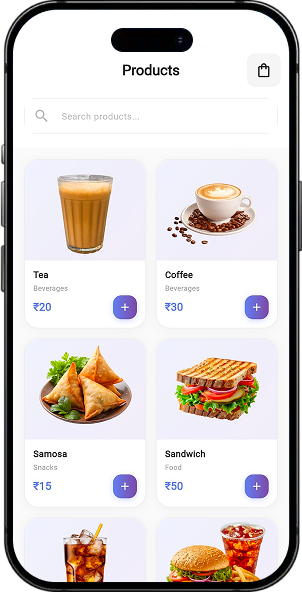
- Overview : Grid-based product browsing with category labels and pricing
- Products : Tea, Coffee, Samosa, Sandwich, Cold Drink, Burger, Pizza Slice, Water Bottle, Ice Cream, Chips
- Interaction : Tap any product card to instantly add it to the cart with a success toast
Cart Management :
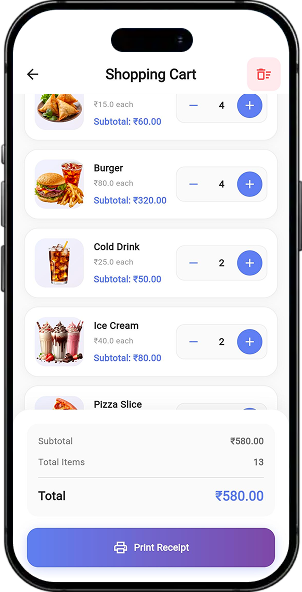
- Overview : Complete shopping cart with real-time reactive UI using GetX observables
- Controls : Increase/decrease quantity per item, remove individual items with confirmation dialog, clear all items
- Display : Per-item subtotal, total item count badge on app bar, and grand total summary panel
WiFi Printer Connection :
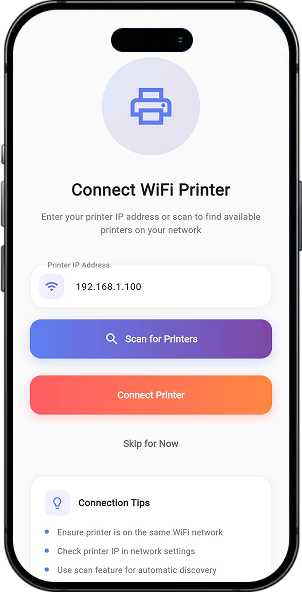
- Overview : Dedicated screen to configure and connect to a network thermal printer
- Input : Manual IP address entry with real-time updates to the controller state
- Auto-scan : Subnet scanning (port 9100) via WifiPrinterScanner to automatically discover printers
- Feedback : Connection status indicator in the navigation drawer (green/red dot with IP label)
- Tips Panel : Built-in guidance card explaining network setup requirements
Thermal Receipt Printing :
- Overview : Fully formatted ESC/POS receipt sent to a connected network printer
- Content : Store header (“Codex Lancers”), address, phone, order number, date/time, cashier name, itemized list with quantities and subtotals, grand total, cash tendered, change, barcode (Code128), and thank-you footer
- Paper : 80mm roll with auto-cut after printing
- Guard : If no printer is connected, a dialog prompts navigation to printer settings before printing
Network Printer Scanner :
- Overview : Background TCP socket scanner that sweeps all 254 IP addresses of a given subnet
- Implementation : Iterates from .1 to .254 and attempts Socket.connect on port 9100 with a configurable timeout
- Result : Returns a list of responsive IP addresses for user selection
Dashboard Home Screen :
- Overview : Central hub for store operations
- Widgets : Featured banner (“Start Billing Your Customers”), quick stats row (Orders / Revenue / Items), 2×2 action grid (Products, Cart, Printer, Reports), and Recent Activity placeholder
- Navigation Drawer : Links to Home, Products, Printer Settings, Order History (coming soon), Settings, and About
Modern Snackbar Notifications :
- Overview : Typed and styled floating toast system replacing default GetX snackbars
- Types : Success (green), Error (red), Info (blue) — each with matching icon and color
- Usage : Cart actions, printer connection results, scan results, and cart clearing operations
Third Party SDKs & Libraries
Carefully selected integrations powering this project's core functionality.
Have a similar idea?
Let's build it together.
From concept to launch we turn your vision into a world-class product. Get a free consultation today.